
Guide to Socket CLI
Introduction to Socket CLI
The Socket CLI is a collection of tools that works with the Socket API.
This is what socket --help shows:
$ socket --help

  CLI for Socket.dev

  Usage
    $ socket <command>
    $ socket scan create --json
    $ socket package score npm lodash --markdown

  Note: All commands have their own --help

  Main commands
    socket login                Setup Socket CLI with an API token and defaults
    socket scan create          Create a new Socket scan and report
    socket npm/[email protected]   Request the Socket score of a package
    socket fix                  Fix CVEs in dependencies
    socket optimize             Optimize dependencies with @socketregistry overrides
    socket cdxgen               Run cdxgen for SBOM generation
    socket ci                   Alias for `socket scan create --report` (creates report and exits with error if unhealthy)

  Socket API
    analytics                   Look up analytics data
    audit-log                   Look up the audit log for an organization
    organization                Manage Socket organization account details
    package                     Look up published package details
    repository                  Manage registered repositories
    scan                        Manage Socket scans
    threat-feed                 [Beta] View the threat-feed

  Local tools
    manifest                    Generate a dependency manifest for certain ecosystems
    npm                         Wraps npm with Socket security scanning
    npx                         Wraps npx with Socket security scanning
    patch                       Apply, manage, and rollback Socket security patches for vulnerable dependencies
    raw-npm                     Run npm without the Socket wrapper
    raw-npx                     Run npx without the Socket wrapper

  CLI configuration
    config                      Manage Socket CLI configuration
    install                     Install Socket CLI tab completion
    login                       Socket API login and CLI setup
    logout                      Socket API logout
    uninstall                   Uninstall Socket CLI tab completion
    wrapper                     Enable or disable the Socket npm/npx wrapper

  Options
    Note: All commands have these flags even when not displayed in their help

    --compact-header            Use compact single-line header format (auto-enabled in CI)
    --config                    Override the local config with this JSON
    --dry-run                   Run without uploading
    --help                      Show help
    --help-full                 Show full help including environment variables
    --no-banner                 Hide the Socket banner
    --no-spinner                Hide the console spinner
    --version                   Print the app version

  Environment variables [more...]
    Use --help-full to view all environment variables
Main features
Control Socket from your terminal and your code!
- Create Socket Security Scans from your terminal with
socket scan create - Get information on the security score of a package through
socket package score - Check if your PR passes your security/license policy by
socket scan create --report - OR take control and automate your workflow through
socket ci - Protect your installs in real time with Socket Firewall (
sfw) across npm, pip, cargo, and more - View security health history dashboards in your terminal with
socket analytics - Easy access to our real time threat feed through
socket threat-feed - Apply security updates to packages through
socket fix - Apply enhanced package overrides with
socket optimize - Control account details on Socket with
socket organization - Most commands support
--jsonand--markdownfor automation - Interactive terminal experience for setup and dashboards
See Socket CLI Commands for an overview of all commands. Or run socket --help to see the available commands.
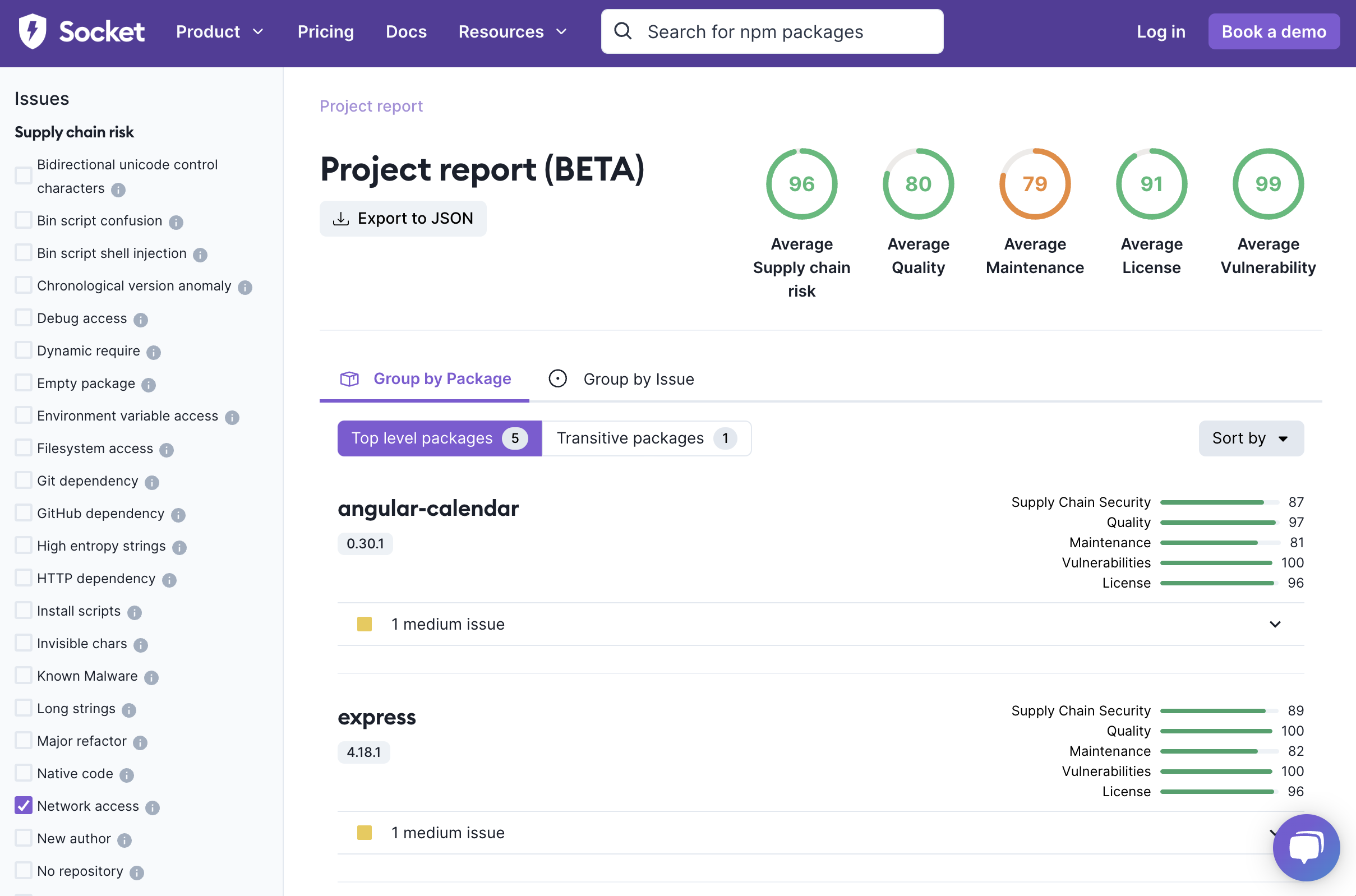
What's in a Scan report?
A Socket Scan contains a full listing of all package issues present in the project, as well as individual health scores for each package and average scores for the whole project.
There's a lot of incredible information about your packages in here:
How does the CLI work?
socket is a multi-command CLI tool.
The basic socket command does nothing more than giving you some help information, the rest of the magic is in the individual commands.
All commands describe themselves if you ask them using --help. There are a few categories of commands:
Commands leveraging the Socket API
These commands give you easy access to our Socket API. This gives you access to organization information, package details, repository management, scan management, analytics, audit logs, and the threat feed.
Most of these commands require an API Token for access with the proper scope depending on the task. Commands will inform you when this is the case. Each command's --help also lists the token permissions it needs. You can generate API Tokens from your Socket dashboard.
Commands running local tools
There are some things we can't do on the server. We don't have access to your full source code and in some purposes or ecosystems we would need that in order to complete our analysis. We also have a few tools that work on your source code.
Local tools are kind of what it sounds like: commands that are expected to run locally. They may generate an artifact that you can upload or commit. But it's something we can't ordinarily do on our servers.
Some local tools do not require an API Token — for example generating manifest files for certain ecosystems (Gradle, Kotlin, Scala/sbt, Bazel, Conda) or running cdxgen. Others run locally but still call the Socket API and therefore require a token, such as socket fix, socket optimize, and full application reachability (socket scan create --reach).
Commands for CLI configuration
There are also a few commands created for management of the CLI itself or its environment.
You can configure all its persisted settings with socket config. You can install the tab-completion script with socket install completion in case you didn't do this when logging in. You can log in with socket login, which sets up a few things for you. You can log out with socket logout or uninstall the tab completion script with socket uninstall completion. You can toggle the wrapper with socket wrapper.
Flags
Every individual (sub-)command supports a few command flags. To find out what flags are supported by a (sub-)command and what they do, see the individual --help page of that command.
Output
The CLI was designed to be able to be used with other tools in mind. You should be able to "pipe" (send) the result (of stdout) of the CLI to another command to work on that result. Most commands that don't require interactivity or calling another tool will support a --json and --markdown flag. When they do, we try really hard to always return a proper response, even if things fall apart.
--json– outputs result as json which you can then pipe intojqand other tools--markdown– outputs result as markdown which you can then copy into an issue, PR or even chat
Generic flags
These flags are supported by every (sub-) command but they are not mentioned in their individual help page. socket --help lists them under "Options".
--compact-header– shows the banner as a single compact line. This is turned on automatically in CI.--config– Overrides the internal config object with the result of this JSON for the duration of this call. Mostly helpful for debugging and tests. Persisting config changes will be disabled when this is used.--dry-run– validate inputs without starting on the actual task. This starts a command and will stop after the input validation.--help– prints the help for the current command. All (sub-) commands have their own help page.--help-full– runsocket --help-fullto print the full top-level help, including the environment variables the CLI reads.--no-banner– hides the Socket banner. The banner is also hidden when you use--jsonor--markdown.--no-spinner– hides the console spinner.--version– runsocket --versionto print the version of the tool. The version information is also printed as part of the banner at the top of every command.
How can I get my hands on this?
Install it like this:
npm install -g socketThe CLI needs Node.js 18.20.8 or newer. See Supported Node.js Versions.
Then run it using commands like:
socket --help
socket package score npm [email protected] --markdown
socket scan create ./proj
socket login
If you don't like to be asked for an API token all of the time you can do socket login to store the token locally. This command also helps you to set up the CLI with interactive questions.
Alternatively you can supply an API Token when running a command by setting it as an environmental variable:
SOCKET_CLI_API_TOKEN=xyz socket scan listThe older SOCKET_SECURITY_API_TOKEN name still works. Run socket --help-full to see all the environment variables the CLI reads.
If you want to add the environment variable for a local project but not globally, then use a tool like direnv.
Is the CLI distributed without using the npm registry?
Not as a fully built artifact. The ability to install software from the npm registry is a normal and generally accepted practice at the time of writing.
The code is open source, though. You can find the repository in its GitHub repository and you can build it manually.
Updated 7 days ago